Obsidian Bible KJV
A fully interlinked King James Bible with 344,000 cross-reference connections built into a local knowledge graph.
Overview
The Bible is full of internal references - verses in the New Testament quoting the Old Testament, parallel accounts across the Gospels, prophetic callbacks spanning thousands of years of text. These connections exist, but most Bible apps treat each chapter as an isolated page. You read Genesis 1:1, and there's no path to the 25+ other verses that directly reference it.
I wanted to study the Bible in Obsidian, where I already take notes, and I wanted those connections to actually be navigable. Not as footnotes or popups on a web app - as real, clickable links in a local knowledge graph I own and control.
What I Built
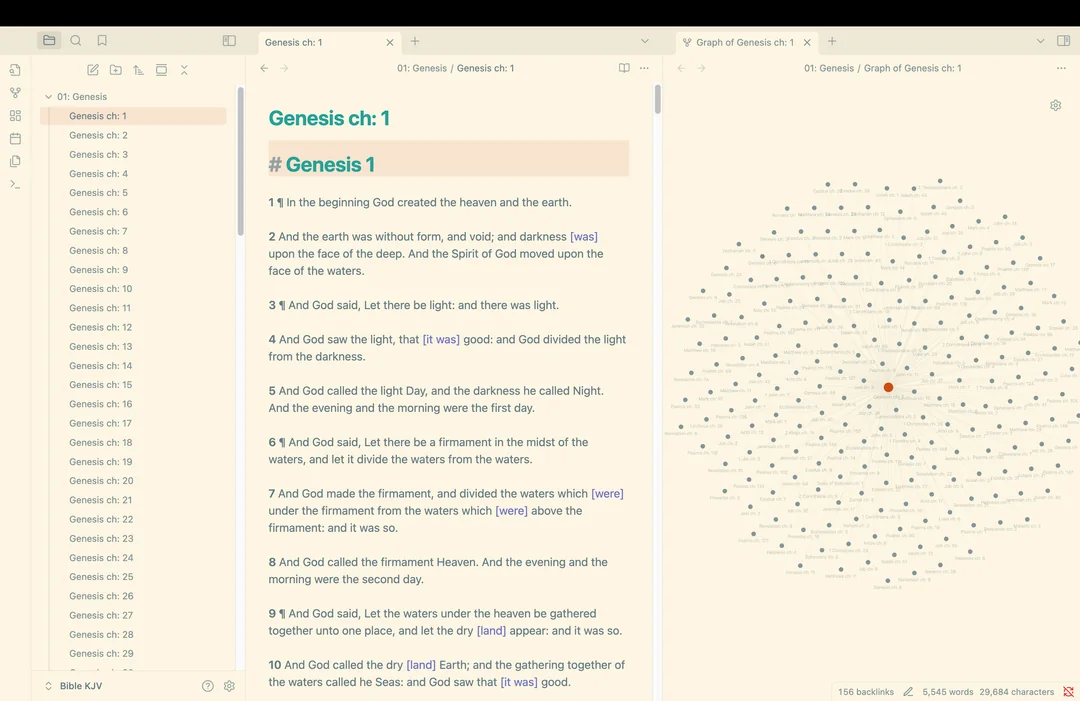
An Obsidian vault containing the entire King James Bible - 66 books, 1,189 chapter files - with 344,000 cross-reference links injected programmatically. Every chapter file contains the full KJV scripture text and a cross-reference section listing each verse-to-verse connection as a native Obsidian link. Opening any chapter's local graph shows every other chapter it connects to, across both testaments.
The whole project took about three days and two Python scripts.
How It Works
The pipeline had two stages.
First, I wrote a Python script to parse a PDF of the KJV Bible and split it into individual markdown files - one per chapter, organized into 66 book folders. The folder structure uses numbered prefixes (01: Genesis, 02: Exodus, etc.) so the file explorer keeps canonical book order.
Second, I pulled the cross-reference dataset from OpenBible.info, which contains roughly 344,000 verse-to-verse connections compiled from the Treasury of Scripture Knowledge and community votes. Each entry maps a source verse to a target verse with a vote score indicating how strong the community considers that connection. I wrote a second Python script that parsed this dataset, matched each reference to the correct chapter file in my vault, and appended it as an Obsidian wikilink under a cross-references heading.
The links point to chapter-level files rather than individual verse anchors. The cross-reference text still names the exact verse (e.g., "Genesis 1:1 to Jeremiah 10:12"), but the Obsidian link resolves to the chapter file. This was a deliberate choice. Obsidian supports block-level linking, but 344,000 block references would have destroyed graph view performance and made the vault borderline unusable. Chapter-level links keep the graph navigable while the reference text preserves verse-level specificity.
I imported the full dataset with no vote-score filtering, including negatively voted references. The vote count is visible on each reference so the user can judge relevance themselves.
Data and Deduplication
The OpenBible dataset has some duplicate entries - the same verse pair appearing more than once with different vote counts or slightly different formatting. The script handles deduplication during the injection step so each cross-reference appears only once per chapter file.
The final vault structure:
- 66 folders, one per book
- 1,189 markdown files, one per chapter
- Each file contains the full chapter text and a cross-references section
- 344,000 total links across the vault
Scale and Performance
Obsidian's graph view renders every note as a node and every link as an edge. At 1,189 nodes and 344,000 edges, the full graph is a dense sphere of connections. It renders, but it taxes the machine - I keep it closed during normal use.
The local graph is where the project is actually useful. Genesis chapter 1 alone has 156 backlinks fanning out to chapters across Isaiah, Psalms, Hebrews, Revelation, and dozens of other books. You can see how one chapter relates to the rest of the Bible at a glance, then click into any connected chapter to keep reading.
Why It Matters
This is a data pipeline project. Take a raw text (a KJV PDF), a public dataset (344,000 cross-references), and two Python scripts - and the output is a structured, navigable knowledge graph inside a tool that was not built to handle this volume of connections. The tradeoffs around linking granularity and performance are real engineering decisions, not configuration choices.
The vault is open source and available on GitHub for anyone to clone into their own Obsidian setup.